

We’re big fans of Statamic here at Webslice. You may have already read our enthusiastic deep-dive into Statamic, which explains why the CMS's flat-file structure was a game-changer, how Statamic makes work easier across the team, and what we appreciate about its thoughtful design. That’s not all, though.
It just so happens that Statamic runs very quickly, reliably, and incredibly cheaply, on Webslice Serverless. Our favorite CMS serves hundreds of thousands of requests a month and runs up bills that we can pay with a few coins. Once again we’re chatting with Ben, who runs our Product & Automation team.
It only costs that much?
“Our webslice.com site has done 212,000 requests in the last 30 days, and we’re sitting at $2.34 for the bill. That includes the $1 base fee,” Ben told us.
Webslice Serverless calculates hosting costs based on usage. It’s a hosting model that’s really well-suited for fast, optimized sites. Statamic’s structure, combined with some clever caching optimizations, makes Serverless hosting extremely cost-effective.
If you're shipping a really performant site, or you're confident you can tweak for the performance, you're not going to get better value for money anywhere else.
It does take technical nous and optimization management to get the most of it. As Ben said, “You need to make sure you're working within the parameters of a serverless environment”.
When you do that, you’ll get hosting that runs more efficiently than anything else we can think of.
“If you can optimize for performance, and optimize for load times, it's going to be great for SEO. It's great for your customers, but it also means you get a small bill. You just can't get that level of performance or that price range elsewhere.”
Optimizing for Serverless
We were already running Statamic sites on our Webslice Containers platform. It’s fast and works really well, but we wanted to squeeze as much as possible out of webslice.com on the Webslice Serverless platform. After all, what better demo for the platform?

“Being a hosting company, we were already pretty focused on website performance, so we didn’t have to change much. It was more tweaking around the edges,” said Ben.
“When you can reduce costs by speeding up your site it becomes a fun game. Can we optimize the image quality of our thumbnails to save a few kilobytes? What can be cached regularly versus loaded dynamically each time? Are we storing persistent files in the right place? Are we using the right session driver?”
Statamic makes a lot of this easy. Its developer flexibility and out-of-the-box caching behaviors align perfectly with serverless hosting environments. The caching options and its flat-file nature make it the perfect combination of a dynamic CMS with static performance on serverless hosting.
Headroom or scalability?
Traditional hosting has you paying a flat monthly fee for a fixed pool of server resources. You spend extra money to have headroom you may never need. In some ways it lets you be inefficient, because a page that’s heavy on the CPU doesn’t matter as much. It’s both a blessing and a curse.
You’re encouraged to look for those optimizations in a serverless environment, because it will reduce your bill. There’s an obvious return on your investment. It just so happens that it ends up giving your visitors a better experience too.
“It made us a little more conscious of how we used our resources. We knew scaling horizontally rather than vertically meant the site would already scale better than before. If we could do it with even less resources and less processing on the server, the already small bill would shrink further,” said Ben.
By leaning into Statamic’s caching capabilities, and utilizing the Webslice CDN, we could serve as much as possible away from the AWS runtime. As a result, we get a hosting setup that handles hundreds of thousands of requests per month for a couple of dollars.
“We can spend that little while also being confident that if we get hit with a whole bunch of traffic, if we get on the front page of Reddit or something like that, the site will scale horizontally and it will do it cost-effectively. Rather than falling over like a traditional server.”
How we’ve set up webslice.com
Configuring Statamic sites on Serverless is a straightforward process, but there are some settings you can tweak to get the most juice out of it.
Balancing resources
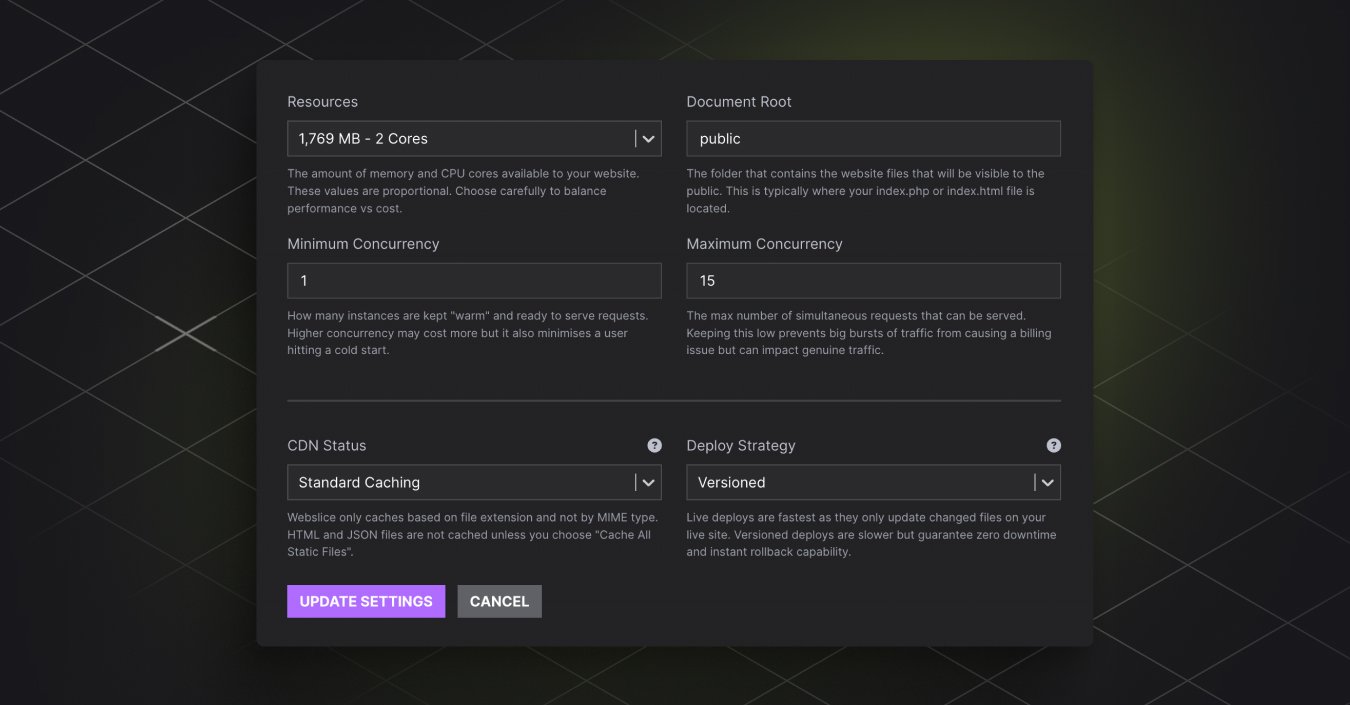
For webslice.com, we’ve found that these resources get the best balance of cost-to-burst performance and response time:
Resources: 1.7GB RAM, 2 CPU cores
Concurrency: 1 instance min, 15 instances max
“Over the last seven days our average CPU utilization and memory utilization sits around 43% CPU and 22% memory. It's generally running for an average of 600 milliseconds (0.6 of a second). So every time a visitor is on the site it’s averaging 600 milliseconds from start to finish,” said Ben.
That 600 milliseconds includes the instance warming up, presenting the site to the user, everything getting to the user, collecting logs, metrics, and closing that connection down effectively.
We’ve made these values the default settings on all Serverless sites, but you can tweak them to suit your project’s needs in the Webslice Console under Settings > Configuration & Performance.
Choosing the deploy strategy
Webslice Serverless sites have the choice of using either versioned or live deploy strategies. For webslice.com we’re using versioned deployments.
“We wipe everything and do a fresh deploy over the top, it's all a fresh load for everything,” said Ben.
If you’ve got a huge codebase, or have content changing in production outside of Git or your shared volume, live deploys could be the way to go.
“The main draws for a live deploy are: the speed of the deploy, and changes in the production environment persisting. Since we don’t make changes in production, aren’t concerned with speed, and only deploy via Git, it isn’t a concern for us. If we do something like a form entry, it’s saved to a shared volume that’s always kept there and ignored by the deployment process. The things we want to persist, do persist. Everything else is just a fresh clean slate every single deploy.”
Knowing when Serverless is right for Statamic
Given Ben’s experience, we asked who the Statamic and Serverless combo is a good fit for.
“The first one would be where you're confident you can optimize for performance and cost. If you're shipping a really performant site, or you're confident you can tweak for the performance, you're not going to get better value for money anywhere else,” said Ben.
Ben also noted that this setup is suited for sites with spiky workloads. A good example is a daily deals site, where at midday you get massive traffic spikes and the rest of the time it’s a lot quieter.
“This sort of platform, where scaling down to close to zero is ideal, will save you a bunch of money because the headroom needed for spiky workloads is massive. It’s massive both resource-wise and cost-wise, but you're only needing it for 10% of the day.”
The easy way to get started
We’ve made setting up Statamic on Serverless simpler by making our own Webslice Statamic provider available. It’s essentially a plugin that you can grab from Git to get your site running on Serverless. You install it via Composer, and it automatically configures your Statamic site with the key settings to run smoothly on Webslice.
“We’ve optimized a lot of the settings for running Statamic out of the box on Serverless. You just install it, and when it recognizes that it’s on Webslice it’ll set logs, image paths and form submissions to go to the shared storage. We’ll make sure the session’s drivers and caches are set to the right formats,” said Ben.
We also have in-depth step-by-step guides to setting up Statamic (as well as other popular CMSs) in our docs.
Questions or feedback
Once you’ve got Statamic up and running on Webslice Serverless we’d love to hear your thoughts. If you have questions or run into anything unexpected, get in touch with our support team.
If you want to give Webslice Serverless a go, spin up your first project today and we'll add $5 to your account.